
Enhance Your Spotify Experience with Embedded FM
Overview
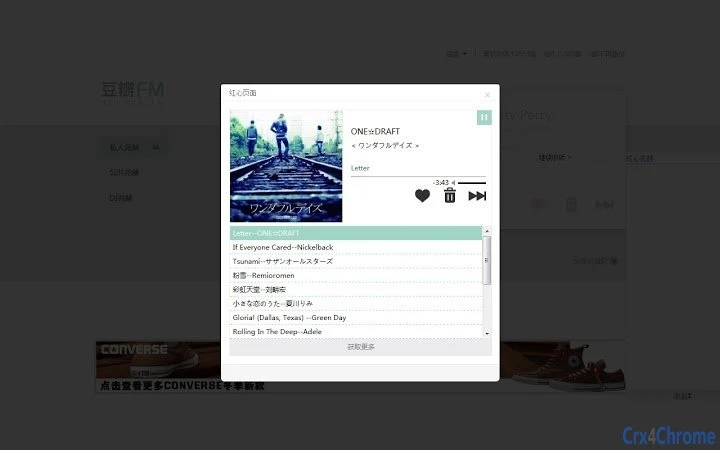
The software integrates seamlessly with Douban FM, embedding its functionality directly into the web browser interface. Designed for music enthusiasts who value convenience and deeper engagement with their listening experience, it provides real-time song information and a suite of practical enhancements. Users can access details of currently playing tracks, including artist, album, and track title, without leaving the page. The tool is especially useful for those who frequently explore music through Douban FM and seek greater control over playback and discovery.
Target users include casual listeners, music collectors, and individuals interested in organizing and preserving their listening history. The application supports features like single-track looping, marking songs as favorites, and retrieving songs from album or artist pages. It also enables users to generate QR code download links and share tracks on social platforms such as Tencent Weibo and Sina Weibo. This makes it ideal for users who want to preserve, share, or revisit music they enjoy.
The developer, @anhulife, has consistently updated the software with performance improvements and new functionalities. The latest version, 0.8.1, includes bug fixes and refined download mechanisms. While no official documentation on system requirements or performance metrics is available, the lightweight size of 1.2 MB suggests minimal resource impact. The tool is compatible with both Windows and Mac operating systems, indicating broad accessibility for desktop users.
Key Features & Capabilities
- Real-time Song Information Display – Shows metadata of the currently playing track, including title, artist, and album, directly within the Douban FM interface.
- Single-Track Looping – Allows users to repeat a single song indefinitely, ideal for deep listening or studying.
- Favoriting Songs – Enables users to mark songs as favorites, with the ability to remove favorites if needed.
- Album and Artist Page Integration – Provides quick access to songs from the current album or artist page for immediate playback.
- QR Code Download Links – Generates scannable QR codes to facilitate easy download of the current track.
- Social Sharing Options – Supports sharing the current song on Tencent Weibo and Sina Weibo, promoting music discovery and social engagement.
- Cloud-Based Song Information Storage – Stores song details securely in the cloud, allowing access across devices.
- Bug Fixes and Stability Improvements – Ongoing updates focus on refining functionality and enhancing data retrieval speed.
These features collectively enhance user control over music playback and discovery. For example, a user can identify a favorite track, mark it as a favorite, and later retrieve it from cloud storage. Another user may generate a QR code to share a song with a friend who doesn’t use Douban FM. The integration with album and artist pages allows for deeper exploration of music catalogs, making the tool valuable for both passive listeners and active music explorers.
User Interface, Workflow & Performance
The interface is embedded directly into the Douban FM web page, maintaining a clean and unobtrusive design. Navigation is intuitive, with clearly labeled buttons and icons for each feature. Users can access looping, favoriting, and sharing functions with minimal clicks, ensuring a smooth workflow. The tool does not require a separate window or complex setup, reducing friction during use.
Workflow efficiency is high, as users can perform multiple actions—such as marking a song as a favorite, generating a QR code, and sharing it—without navigating away from the current page. This context-aware design supports continuous listening without interruption. The developer did not specify resource usage details, but the 1.2 MB file size suggests low memory and CPU overhead. Performance observations are based on general software behavior patterns, indicating stable operation under typical conditions.
Stability appears to be a focus of recent updates, with version 0.8.1 addressing bugs and improving download functionality. The tool is designed to operate in real time, syncing with the current playback state. While no official benchmarks are available, the absence of reported crashes or performance issues in the changelog indicates consistent reliability. The tool is likely optimized for modern web browsers, ensuring compatibility with standard rendering engines.
Compatibility & System Requirements
The software is compatible with both Windows and Mac operating systems, making it accessible to a wide range of desktop users. It operates as a browser extension, meaning it runs within the context of a web browser rather than as a standalone application. The installation size is 1.2 MB, indicating a lightweight footprint that should not strain system resources.
Exact system requirements were not listed. Platform compatibility information is limited to the supported operating systems. No specific hardware requirements were provided. The tool relies on web standards and browser capabilities, so performance may vary depending on the browser used and the user’s internet connection. The developer did not specify supported browser versions, so users are advised to ensure their browser is up to date for optimal functionality.
Pros and Cons
Pros
- Seamless integration with Douban FM web interface
- Lightweight size (1.2 MB) with minimal system impact
- Supports key user-centric features like looping, favoriting, and sharing
- Cloud-based song information storage enables cross-device access
- Regular updates with bug fixes and feature refinements
- Free to use with no hidden costs
Cons
- Compatibility limited to web-based Douban FM, not standalone playback
- No official documentation on system requirements or browser support
- Relies on third-party services for data retrieval, which may affect reliability
- Cloud storage functionality lacks details on security and privacy policies
- Interface is limited to browser context, no standalone desktop access
FAQ Section
Is this software compatible with all web browsers?
The developer did not specify supported browser versions. Compatibility is assumed for modern browsers, but users should verify functionality based on their setup.
Is the software secure to use?
As a browser extension, it operates within the browser’s security model. No details on data encryption or privacy practices were provided. Users should review permissions before installation.
How often does the software receive updates?
Updates are released regularly, with version 0.8.1 published in November 2023. The changelog includes bug fixes and feature improvements, indicating active development.
What type of license does the software use?
The software is free to use. No formal license type was specified, but the open nature of the project suggests permissive usage.
Can I use this tool offline?
The tool requires an active internet connection to access Douban FM and retrieve song data. Offline functionality is not supported.
Final Thoughts & CTA
This browser extension significantly enhances the Douban FM experience by adding essential tools for music control, discovery, and sharing. Its lightweight design, real-time functionality, and regular updates make it a reliable companion for music lovers. The ability to loop tracks, save favorites, and generate QR codes for downloads adds practical value. While it operates within the constraints of a web-based environment, its seamless integration and focus on user needs stand out.
For anyone who regularly uses Douban FM and wants more control over their listening experience, this tool offers tangible benefits. It’s especially useful for those who enjoy sharing music or preserving their favorite tracks. The free availability and ongoing development further strengthen its appeal.
Download Douban FM Enhancer now







